


Atlassian Rovo MCP connector
OAuth 2.0 project_managementproductivityConnect to Atlassian Rovo MCP server to manage Jira issues, Confluence pages, and Compass components directly from your AI workflows.
Atlassian Rovo MCP connector
-
Install the SDK
Section titled “Install the SDK”Terminal window npm install @scalekit-sdk/nodeTerminal window pip install scalekit -
Set your credentials
Section titled “Set your credentials”Add your Scalekit credentials to your
.envfile. Find values in app.scalekit.com > Developers > API Credentials..env SCALEKIT_ENVIRONMENT_URL=<your-environment-url>SCALEKIT_CLIENT_ID=<your-client-id>SCALEKIT_CLIENT_SECRET=<your-client-secret> -
Set up the connector
Section titled “Set up the connector”Register your Atlassian Rovo MCP credentials with Scalekit so it handles the token lifecycle. You do this once per environment.
Dashboard setup steps
Atlassian Rovo MCP uses Dynamic Client Registration (DCR) — no client ID or secret is needed. The only step is registering your Scalekit redirect URI as an allowed domain in Atlassian Administration.
-
Copy the redirect URI from Scalekit
In the Scalekit dashboard, go to AgentKit > Connections > Create Connection. Find Atlassian Rovo MCP and click Create. Copy the redirect URI — it looks like
https://<SCALEKIT_ENVIRONMENT_URL>/sso/v1/oauth/<CONNECTION_ID>/callback.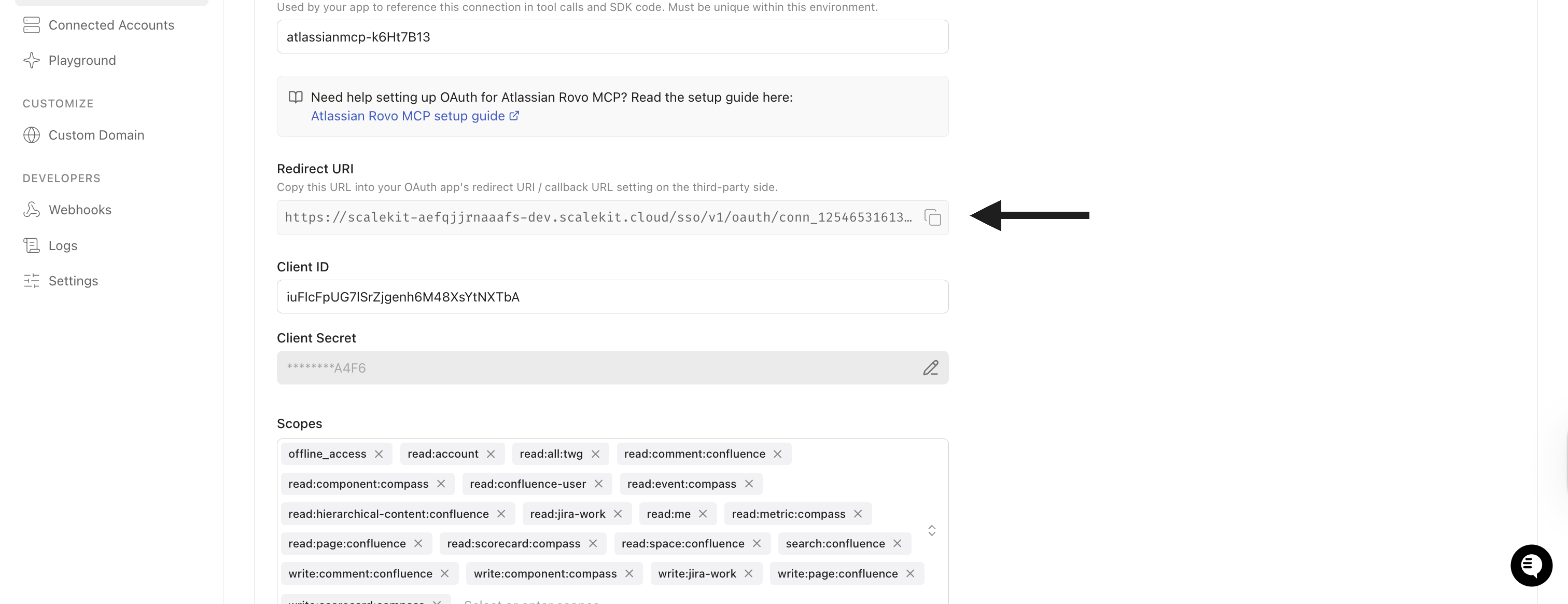
-
Open the Rovo MCP server settings in Atlassian
- Go to admin.atlassian.com and select your organisation.
- In the left sidebar, expand Rovo and click Rovo access.
- Click Rovo MCP server in the submenu.
- Select the Domains tab at the top of the page.
-
Add the redirect URI as a domain
- Under Your domains, click Add domain.
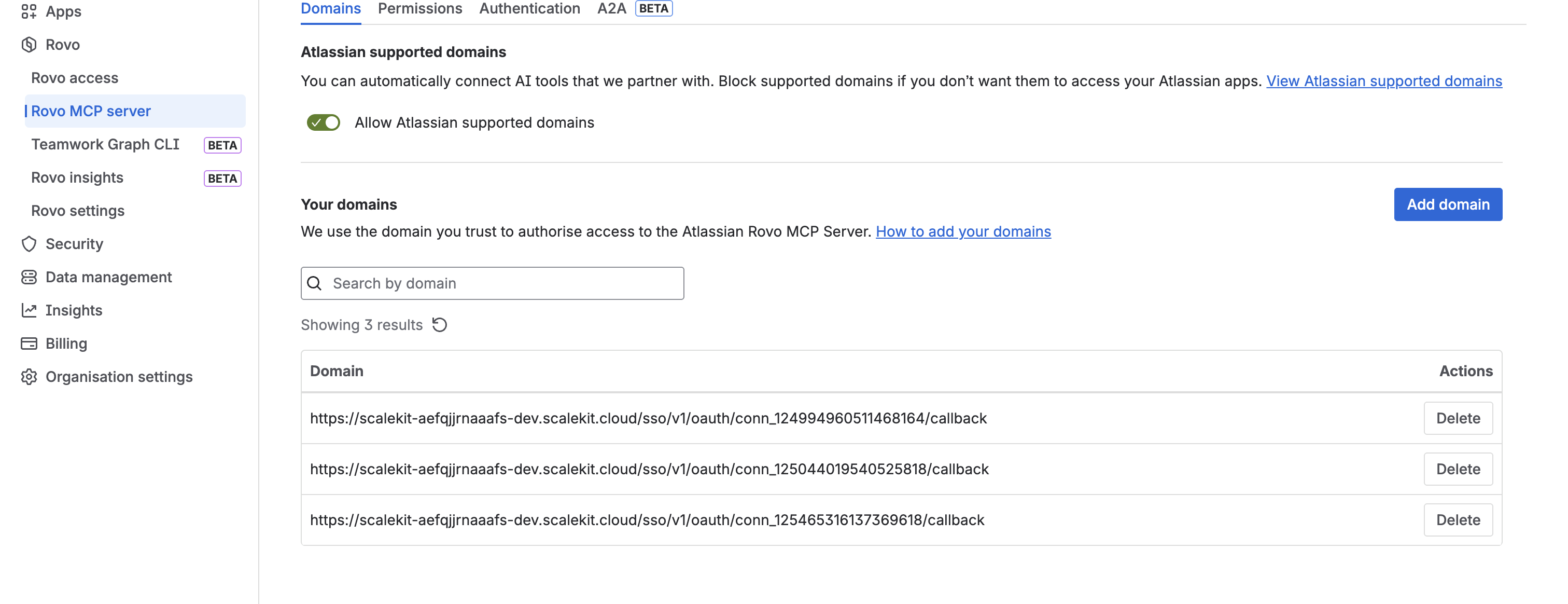
- In the Add domain dialog, paste the redirect URI from Scalekit into the Domain field.
- Accept the terms and click Add.
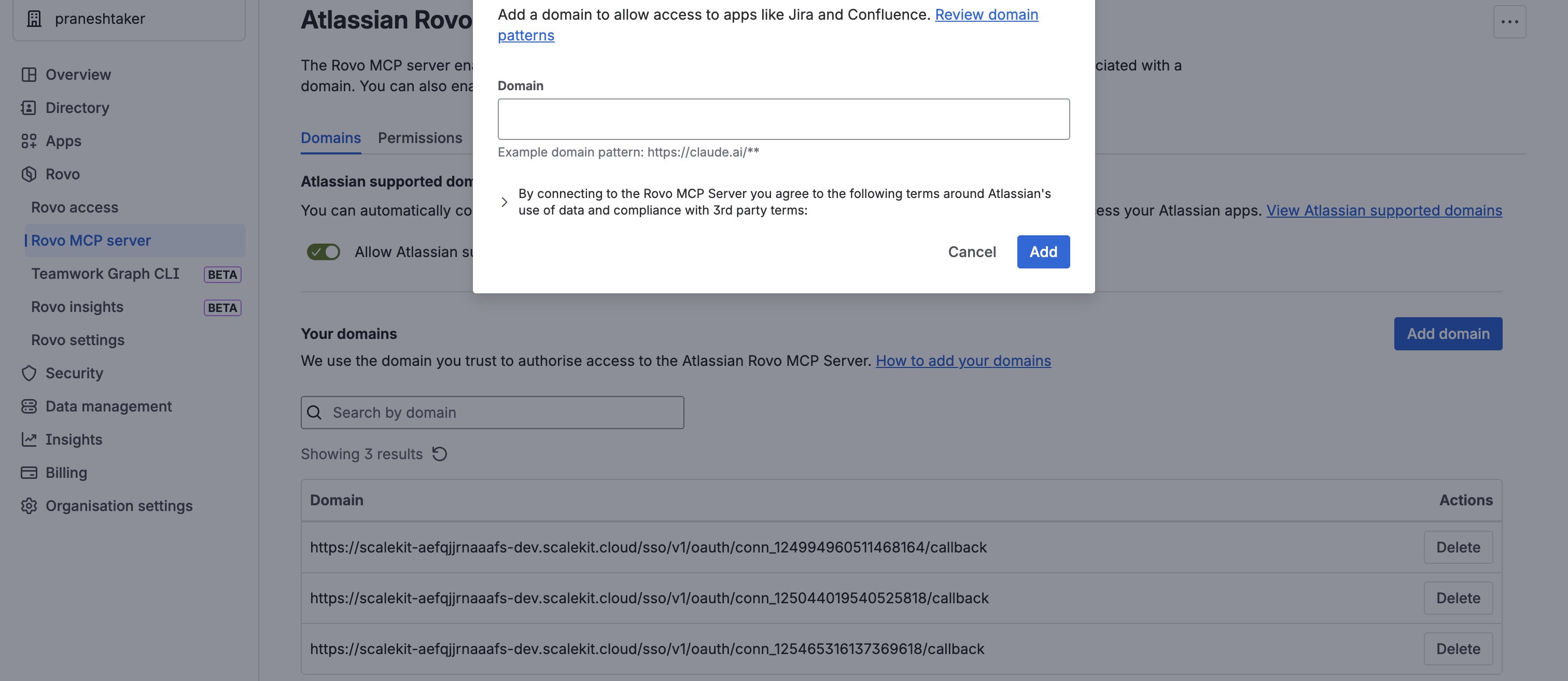
Once added, Scalekit automatically registers the OAuth client via DCR and handles token management for every user who authorizes the connection — no further configuration needed.
-
-
Authorize and make your first call
Section titled “Authorize and make your first call”quickstart.ts import { ScalekitClient } from '@scalekit-sdk/node'import 'dotenv/config'const scalekit = new ScalekitClient(process.env.SCALEKIT_ENV_URL,process.env.SCALEKIT_CLIENT_ID,process.env.SCALEKIT_CLIENT_SECRET,)const actions = scalekit.actionsconst connector = 'atlassianmcp'const identifier = 'user_123'// Generate an authorization link for the userconst { link } = await actions.getAuthorizationLink({ connectionName: connector, identifier })console.log('Authorize Atlassian Rovo MCP:', link)process.stdout.write('Press Enter after authorizing...')await new Promise(r => process.stdin.once('data', r))// Make your first callconst result = await actions.executeTool({connector,identifier,toolName: 'atlassianmcp_fetch',toolInput: { id: 'https://example.com/id' },})console.log(result)quickstart.py import osfrom scalekit.client import ScalekitClientfrom dotenv import load_dotenvload_dotenv()scalekit_client = ScalekitClient(env_url=os.getenv("SCALEKIT_ENV_URL"),client_id=os.getenv("SCALEKIT_CLIENT_ID"),client_secret=os.getenv("SCALEKIT_CLIENT_SECRET"),)actions = scalekit_client.actionsconnection_name = "atlassianmcp"identifier = "user_123"# Generate an authorization link for the userlink_response = actions.get_authorization_link(connection_name=connection_name,identifier=identifier,)print("Authorize Atlassian Rovo MCP:", link_response.link)input("Press Enter after authorizing...")# Make your first callresult = actions.execute_tool(tool_input={"id":"https://example.com/id"},tool_name="atlassianmcp_fetch",connection_name=connection_name,identifier=identifier,)print(result)
What you can do
Section titled “What you can do”Connect this agent connector to let your agent:
- Manage Jira issues — create, edit, transition, comment on, and link issues; add worklogs
- Search with JQL — query issues using Jira Query Language with full field and filter support
- Work with Confluence — create, update, and retrieve pages; add footer and inline comments
- Manage Compass components — create, get, and search services, libraries, and applications; define custom fields and relationships
- Look up users and resources — resolve Atlassian account IDs, list accessible cloud sites, and find project metadata
- Fetch Atlassian content — retrieve any Atlassian object by its ARI or URL (e.g. a Jira issue or Confluence page URL)
Common workflows
Section titled “Common workflows”Get your cloud ID
Most Atlassian Rovo MCP tools require a cloudId — the UUID that identifies your Atlassian cloud site. Call atlassianmcp_getaccessibleatlassianresources once to retrieve it, then pass the id field value in every subsequent tool call.
// Step 1 — get the cloud IDconst resources = await actions.executeTool({ connectionName: 'atlassianmcp', identifier: 'user_123', toolName: 'atlassianmcp_getaccessibleatlassianresources', toolInput: {},});const cloudId = resources[0].id;
// Step 2 — use cloudId in subsequent callsconst issue = await actions.executeTool({ connectionName: 'atlassianmcp', identifier: 'user_123', toolName: 'atlassianmcp_getjiraissue', toolInput: { cloudId, issueIdOrKey: 'KAN-1', },});console.log(issue);# Step 1 — get the cloud IDresources = actions.execute_tool( connection_name="atlassianmcp", identifier="user_123", tool_name="atlassianmcp_getaccessibleatlassianresources", tool_input={},)cloud_id = resources[0]["id"]
# Step 2 — use cloud_id in subsequent callsissue = actions.execute_tool( connection_name="atlassianmcp", identifier="user_123", tool_name="atlassianmcp_getjiraissue", tool_input={ "cloudId": cloud_id, "issueIdOrKey": "KAN-1", },)print(issue)The atlassianmcp_getaccessibleatlassianresources response looks like this:
[ { "id": "a4c9b3e2-1234-5678-abcd-ef0123456789", "name": "My Company", "url": "https://mycompany.atlassian.net", "scopes": ["read:jira-work", "write:jira-work", "read:confluence-content.all"] }]Use id as the cloudId parameter. If the user belongs to multiple Atlassian sites, the list contains one entry per site — pick the one matching the target url.
Tool list
Section titled “Tool list”Use the exact tool names from the Tool list below when you call execute_tool. If you’re not sure which name to use, list the tools available for the current user first.
atlassianmcp_addcommenttojiraissue
#
Add a comment to an existing Jira issue. 6 params
Add a comment to an existing Jira issue.
cloudId string required The cloud site ID (UUID) of your Atlassian instance. Use getAccessibleAtlassianResources to retrieve it. commentBody string required The text content of the comment to add. issueIdOrKey string required The Jira issue ID (e.g. 10001) or key (e.g. KAN-1). commentVisibility object optional Restrict comment visibility as JSON (e.g. {"type": "role", "value": "Dev Team"}). contentFormat string optional Format of the content body — use markdown for plain text or adf for Atlassian Document Format (JSON). responseContentFormat string optional Format to return content in — markdown (default) or adf. atlassianmcp_addworklogtojiraissue
#
Log time spent on a Jira issue by adding a worklog entry. 8 params
Log time spent on a Jira issue by adding a worklog entry.
cloudId string required The cloud site ID (UUID) of your Atlassian instance. Use getAccessibleAtlassianResources to retrieve it. issueIdOrKey string required The Jira issue ID (e.g. 10001) or key (e.g. KAN-1). timeSpent string required Time spent on the issue, in Jira duration format (e.g. 1h, 2h 30m, 1d). commentBody string optional The text content of the comment to add. contentFormat string optional Format of the content body — use markdown for plain text or adf for Atlassian Document Format (JSON). started string optional The date and time the work started, in ISO 8601 format (e.g. 2026-05-15T10:00:00.000+0000). visibility object optional Restrict worklog visibility as JSON (e.g. {"type": "role", "value": "Dev Team"}). worklogId string optional The ID of an existing worklog entry to update. atlassianmcp_atlassianuserinfo
#
Retrieve the profile information for the currently authenticated Atlassian user. 0 params
Retrieve the profile information for the currently authenticated Atlassian user.
atlassianmcp_createcompasscomponent
#
Create a new component in Atlassian Compass (e.g. a service, library, or application). 6 params
Create a new component in Atlassian Compass (e.g. a service, library, or application).
cloudId string required The cloud site ID (UUID) of your Atlassian instance. Use getAccessibleAtlassianResources to retrieve it. name string required Name of the Compass component. typeId string required Type ID of the Compass component (e.g. SERVICE, LIBRARY, APPLICATION). description string optional A human-readable description of this Compass component. labels array optional Labels to attach to this Compass component. ownerId string optional Atlassian account ID of the component owner. atlassianmcp_createcompasscomponentrelationship
#
Create a dependency or relationship between two Compass components. 4 params
Create a dependency or relationship between two Compass components.
cloudId string required The cloud site ID (UUID) of your Atlassian instance. Use getAccessibleAtlassianResources to retrieve it. fromComponentId string required The ID of the source Compass component in the relationship. relationshipType string required The type of relationship between components (e.g. DEPENDS_ON). toComponentId string required The ID of the target Compass component in the relationship. atlassianmcp_createcompasscustomfielddefinition
#
Define a new custom field for Compass components in your workspace. 2 params
Define a new custom field for Compass components in your workspace.
cloudId string required The cloud site ID (UUID) of your Atlassian instance. Use getAccessibleAtlassianResources to retrieve it. input object required Custom field definition as JSON (fields: name, type, description). atlassianmcp_createconfluenceinlinecomment
#
Add an inline comment anchored to selected text on a Confluence page. 7 params
Add an inline comment anchored to selected text on a Confluence page.
body string required The body content of the Confluence page or comment, in the format specified by contentFormat. cloudId string required The cloud site ID (UUID) of your Atlassian instance. Use getAccessibleAtlassianResources to retrieve it. contentFormat string optional Format of the content body — use markdown for plain text or adf for Atlassian Document Format (JSON). contentType string optional Type of Confluence content: page, blogpost, or custom. inlineCommentProperties object optional Inline comment anchor as JSON: {"textSelection": "<text>", "textSelectionMatchCount": N, "textSelectionMatchIndex": N}. pageId string optional The numeric ID of the Confluence page. Use getConfluenceSpaces or search to find page IDs. parentCommentId string optional Optional ID of the parent comment, for creating a reply. atlassianmcp_createconfluencepage
#
Create a new Confluence page in a space, optionally nested under a parent page. 10 params
Create a new Confluence page in a space, optionally nested under a parent page.
body string required The body content of the Confluence page or comment, in the format specified by contentFormat. cloudId string required The cloud site ID (UUID) of your Atlassian instance. Use getAccessibleAtlassianResources to retrieve it. spaceId string required The numeric ID of the Confluence space. Use getConfluenceSpaces to list available spaces. contentFormat string optional Format of the content body — use markdown for plain text or adf for Atlassian Document Format (JSON). contentType string optional Type of Confluence content: page, blogpost, or custom. isPrivate boolean optional Set to true to create the page as private (only visible to the creator). parentId string optional The ID of the parent page under which to create or move this page. status string optional Filter by content status (e.g. current, archived, trashed). subtype string optional Confluence page subtype (e.g. live for live pages). title string optional The title of the Confluence page. atlassianmcp_createissuelink
#
Link two Jira issues together with a relationship type (e.g. Relates, Blocks, Duplicate). 6 params
Link two Jira issues together with a relationship type (e.g. Relates, Blocks, Duplicate).
cloudId string required The cloud site ID (UUID) of your Atlassian instance. Use getAccessibleAtlassianResources to retrieve it. inwardIssue string required The key of the inward issue in the link (e.g. KAN-1). outwardIssue string required The key of the outward issue in the link (e.g. KAN-2). type string required Space type filter (e.g. global or personal). comment string optional An optional comment to attach to the issue link. contentFormat string optional Format of the content body — use markdown for plain text or adf for Atlassian Document Format (JSON). atlassianmcp_createjiraissue
#
Create a new Jira issue in a project with the specified summary, type, and optional fields. 11 params
Create a new Jira issue in a project with the specified summary, type, and optional fields.
cloudId string required The cloud site ID (UUID) of your Atlassian instance. Use getAccessibleAtlassianResources to retrieve it. issueTypeName string required The name of the Jira issue type (e.g. Task, Story, Bug, Epic). projectKey string required The Jira project key (e.g. KAN). Use getVisibleJiraProjects to list available projects. summary string required A short summary of the Jira issue (the issue title). additional_fields object optional Additional Jira fields to set on creation, as a JSON object (e.g. priority, labels). assignee_account_id string optional Atlassian account ID of the user to assign. Use lookupJiraAccountId to find account IDs. contentFormat string optional Format of the content body — use markdown for plain text or adf for Atlassian Document Format (JSON). description string optional The full description of the Jira issue. parent string optional The parent issue key (e.g. KAN-1) for creating subtasks or child issues. responseContentFormat string optional Format to return content in — markdown (default) or adf. transition object optional The transition to perform, as JSON: {"id": "<transition_id>"}. Use getTransitionsForJiraIssue to list valid transitions. atlassianmcp_editjiraissue
#
Update fields on an existing Jira issue, such as summary, priority, or description. 5 params
Update fields on an existing Jira issue, such as summary, priority, or description.
cloudId string required The cloud site ID (UUID) of your Atlassian instance. Use getAccessibleAtlassianResources to retrieve it. fields object required Fields to update as a JSON object, e.g. {"summary": "New title", "priority": {"name": "High"}}. issueIdOrKey string required The Jira issue ID (e.g. 10001) or key (e.g. KAN-1). contentFormat string optional Format of the content body — use markdown for plain text or adf for Atlassian Document Format (JSON). responseContentFormat string optional Format to return content in — markdown (default) or adf. atlassianmcp_fetch
#
Fetch details about any Atlassian object by its ARI (Atlassian Resource Identifier) or URL. 2 params
Fetch details about any Atlassian object by its ARI (Atlassian Resource Identifier) or URL.
id string required An ARI or URL identifying the object (e.g. ari:cloud:jira:...:issue/10059 or https://site.atlassian.net/browse/KAN-1). cloudId string optional The cloud site ID (UUID) of your Atlassian instance. Use getAccessibleAtlassianResources to retrieve it. atlassianmcp_getaccessibleatlassianresources
#
List all Atlassian cloud sites accessible to the authenticated user, including their cloud IDs. 0 params
List all Atlassian cloud sites accessible to the authenticated user, including their cloud IDs.
atlassianmcp_getcompasscomponent
#
Retrieve details of a specific Compass component by its ID. 5 params
Retrieve details of a specific Compass component by its ID.
cloudId string required The cloud site ID (UUID) of your Atlassian instance. Use getAccessibleAtlassianResources to retrieve it. componentId string required The ID of the component to get includeCustomFieldsInResponse boolean optional Set to true to include custom field values in the component response. includeRelatedComponentsAndDependenciesInResponse boolean optional Set to true to include related components and dependencies. includeRelatedLinksInResponse boolean optional Set to true to include related links in the component response. atlassianmcp_getcompasscomponents
#
Search and list Compass components in a workspace, with optional filters. 5 params
Search and list Compass components in a workspace, with optional filters.
cloudId string required The cloud site ID (UUID) of your Atlassian instance. Use getAccessibleAtlassianResources to retrieve it. after string optional Cursor for fetching the next page of results. filters object optional Filter criteria for Compass components as JSON (e.g. {"typeIds": ["SERVICE"]}). maxResults number optional Maximum number of results to return per page. query string optional Search query to find Atlassian content across Jira and Confluence. atlassianmcp_getcompasscustomfielddefinitions
#
List all custom field definitions configured in a Compass workspace. 1 param
List all custom field definitions configured in a Compass workspace.
cloudId string required The cloud site ID (UUID) of your Atlassian instance. Use getAccessibleAtlassianResources to retrieve it. atlassianmcp_getconfluencecommentchildren
#
Retrieve replies to a specific Confluence comment. 7 params
Retrieve replies to a specific Confluence comment.
cloudId string required The cloud site ID (UUID) of your Atlassian instance. Use getAccessibleAtlassianResources to retrieve it. commentId string required The ID of the Confluence comment to retrieve children for. commentType string required Type of comment to retrieve children for: footer or inline. contentFormat string optional Format of the content body — use markdown for plain text or adf for Atlassian Document Format (JSON). cursor string optional Cursor string for paginating through results. limit number optional Maximum number of items to return. sort string optional Sort order for results (e.g. created-date, -modified, title). atlassianmcp_getconfluencepage
#
Retrieve the content and metadata of a specific Confluence page by its ID. 4 params
Retrieve the content and metadata of a specific Confluence page by its ID.
cloudId string required The cloud site ID (UUID) of your Atlassian instance. Use getAccessibleAtlassianResources to retrieve it. pageId string required The numeric ID of the Confluence page. Use getConfluenceSpaces or search to find page IDs. contentFormat string optional Format of the content body — use markdown for plain text or adf for Atlassian Document Format (JSON). contentType string optional Type of Confluence content: page, blogpost, or custom. atlassianmcp_getconfluencepagedescendants
#
List all pages nested under a Confluence page, up to a specified depth. 5 params
List all pages nested under a Confluence page, up to a specified depth.
cloudId string required The cloud site ID (UUID) of your Atlassian instance. Use getAccessibleAtlassianResources to retrieve it. pageId string required The numeric ID of the Confluence page. Use getConfluenceSpaces or search to find page IDs. cursor string optional Cursor string for paginating through results. depth number optional How deep to fetch descendants — all for the full tree or 1 for direct children only. limit number optional Maximum number of items to return. atlassianmcp_getconfluencepageinlinecomments
#
List inline comments on a Confluence page, optionally filtered by resolution status. 11 params
List inline comments on a Confluence page, optionally filtered by resolution status.
cloudId string required The cloud site ID (UUID) of your Atlassian instance. Use getAccessibleAtlassianResources to retrieve it. pageId string required The numeric ID of the Confluence page. Use getConfluenceSpaces or search to find page IDs. contentFormat string optional Format of the content body — use markdown for plain text or adf for Atlassian Document Format (JSON). contentType string optional Type of Confluence content: page, blogpost, or custom. cursor string optional Cursor string for paginating through results. includeReplies boolean optional Whether to include comment replies in the response (true or false). limit number optional Maximum number of items to return. repliesPerComment integer optional Maximum number of replies to include per comment. resolutionStatus string optional Filter inline comments by resolution status (open or resolved). sort string optional Sort order for results (e.g. created-date, -modified, title). status string optional Filter by content status (e.g. current, archived, trashed). atlassianmcp_getconfluencespaces
#
List Confluence spaces accessible to the authenticated user, with optional filters. 11 params
List Confluence spaces accessible to the authenticated user, with optional filters.
cloudId string required The cloud site ID (UUID) of your Atlassian instance. Use getAccessibleAtlassianResources to retrieve it. expand string optional Comma-separated list of fields to expand in the response. favoritedBy string optional Return spaces favourited by this user account ID. favourite boolean optional Set to true to return only spaces marked as favourite. ids string optional List of space IDs to filter by. keys string optional List of space keys to filter by. labels array optional List of space labels to filter by. limit number optional Maximum number of items to return. start number optional Index of the first result for pagination (defaults to 0). status string optional Filter by content status (e.g. current, archived, trashed). type string optional Space type filter (e.g. global or personal). atlassianmcp_getissuelinktypes
#
List all available issue link types in a Jira instance (e.g. Blocks, Relates, Duplicate). 1 param
List all available issue link types in a Jira instance (e.g. Blocks, Relates, Duplicate).
cloudId string required The cloud site ID (UUID) of your Atlassian instance. Use getAccessibleAtlassianResources to retrieve it. atlassianmcp_getjiraissue
#
Retrieve the details of a specific Jira issue by its ID or key. 9 params
Retrieve the details of a specific Jira issue by its ID or key.
cloudId string required The cloud site ID (UUID) of your Atlassian instance. Use getAccessibleAtlassianResources to retrieve it. issueIdOrKey string required The Jira issue ID (e.g. 10001) or key (e.g. KAN-1). expand string optional Comma-separated list of fields to expand in the response. failFast boolean optional Set to true to fail fast if any fields cannot be found. fields array optional Fields to update as a JSON object, e.g. {"summary": "New title", "priority": {"name": "High"}}. fieldsByKeys boolean optional Set to true to reference custom fields by their keys instead of IDs. properties array optional List of issue properties to include in the response. responseContentFormat string optional Format to return content in — markdown (default) or adf. updateHistory boolean optional Set to true to record that the issue was viewed in the user's history. atlassianmcp_getjiraissueremoteissuelinks
#
List remote links (external resources) attached to a Jira issue. 3 params
List remote links (external resources) attached to a Jira issue.
cloudId string required The cloud site ID (UUID) of your Atlassian instance. Use getAccessibleAtlassianResources to retrieve it. issueIdOrKey string required The Jira issue ID (e.g. 10001) or key (e.g. KAN-1). globalId string optional Optional global ID to filter remote issue links. atlassianmcp_getjiraissuetypemetawithfields
#
Retrieve field metadata for a specific Jira issue type in a project. 5 params
Retrieve field metadata for a specific Jira issue type in a project.
cloudId string required The cloud site ID (UUID) of your Atlassian instance. Use getAccessibleAtlassianResources to retrieve it. issueTypeId string required The ID of the Jira issue type. Use getJiraProjectIssueTypesMetadata to list available types. projectIdOrKey string required The Jira project ID or key (e.g. KAN or 10000). Use getVisibleJiraProjects to find it. maxResults number optional Maximum number of results to return per page. startAt number optional Index of the first result to return (for pagination, defaults to 0). atlassianmcp_getjiraprojectissuetypesmetadata
#
List all issue types and their field metadata for a Jira project. 4 params
List all issue types and their field metadata for a Jira project.
cloudId string required The cloud site ID (UUID) of your Atlassian instance. Use getAccessibleAtlassianResources to retrieve it. projectIdOrKey string required The Jira project ID or key (e.g. KAN or 10000). Use getVisibleJiraProjects to find it. maxResults number optional Maximum number of results to return per page. startAt number optional Index of the first result to return (for pagination, defaults to 0). atlassianmcp_getpagesinconfluencespace
#
List all pages in a Confluence space, optionally filtered by title or status. 9 params
List all pages in a Confluence space, optionally filtered by title or status.
cloudId string required The cloud site ID (UUID) of your Atlassian instance. Use getAccessibleAtlassianResources to retrieve it. spaceId string required The numeric ID of the Confluence space. Use getConfluenceSpaces to list available spaces. contentFormat string optional Format of the content body — use markdown for plain text or adf for Atlassian Document Format (JSON). contentType string optional Type of Confluence content: page, blogpost, or custom. cursor string optional Cursor string for paginating through results. limit number optional Maximum number of items to return. sort string optional Sort order for results (e.g. created-date, -modified, title). status string optional Filter by content status (e.g. current, archived, trashed). title string optional The title of the Confluence page. atlassianmcp_getteamworkgraphcontext
#
Retrieve the teamwork graph context for an Atlassian object, showing related work across Jira, Confluence, and Compass. 9 params
Retrieve the teamwork graph context for an Atlassian object, showing related work across Jira, Confluence, and Compass.
cloudId string required The cloud site ID (UUID) of your Atlassian instance. Use getAccessibleAtlassianResources to retrieve it. objectIdentifier string required Identifier for the object — an issue key (e.g. KAN-4), ARI, or URL. objectType string required Type of the Atlassian object (e.g. JiraWorkItem, ConfluencePage, ConfluenceSpace, AtlassianUser, CompassComponent). after string optional Cursor for fetching the next page of results. detailLevel string optional Level of detail to return for related objects (FULL or MINIMAL). first integer optional Number of items to return in this page. relationshipTypes array optional Filter by specific relationship types (e.g. DEPENDS_ON, BLOCKED_BY). targetObjectTypes array optional Filter related objects by type (e.g. JiraWorkItem, ConfluencePage). timeRange object optional Optional time range filter as JSON: {"from": "<ISO8601>", "to": "<ISO8601>"}. atlassianmcp_getteamworkgraphobject
#
Hydrate one or more Atlassian objects from their URLs or ARIs to get their current state. 2 params
Hydrate one or more Atlassian objects from their URLs or ARIs to get their current state.
cloudId string required The cloud site ID (UUID) of your Atlassian instance. Use getAccessibleAtlassianResources to retrieve it. objects array required List of object URLs or ARIs to hydrate (e.g. https://site.atlassian.net/browse/KAN-1). atlassianmcp_gettransitionsforjiraissue
#
List all available workflow transitions for a Jira issue, used before calling transitionJiraIssue. 7 params
List all available workflow transitions for a Jira issue, used before calling transitionJiraIssue.
cloudId string required The cloud site ID (UUID) of your Atlassian instance. Use getAccessibleAtlassianResources to retrieve it. issueIdOrKey string required The Jira issue ID (e.g. 10001) or key (e.g. KAN-1). expand string optional Comma-separated list of fields to expand in the response. includeUnavailableTransitions boolean optional Set to true to include transitions that are not currently available. skipRemoteOnlyCondition boolean optional Set to true to skip conditions that only apply to remote calls. sortByOpsBarAndStatus boolean optional Set to true to sort transitions by the ops bar and status. transitionId string optional The ID of a specific transition to retrieve. Use getTransitionsForJiraIssue to list transitions. atlassianmcp_getvisiblejiraprojects
#
List Jira projects visible to the authenticated user, with optional search filtering. 6 params
List Jira projects visible to the authenticated user, with optional search filtering.
cloudId string required The cloud site ID (UUID) of your Atlassian instance. Use getAccessibleAtlassianResources to retrieve it. action string optional The action to filter projects by (e.g. browse, create). expandIssueTypes boolean optional Set to true to include issue type details in the project list response. maxResults number optional Maximum number of results to return per page. searchString string optional Text to search for when looking up Jira users. startAt number optional Index of the first result to return (for pagination, defaults to 0). atlassianmcp_lookupjiraaccountid
#
Search for Atlassian user accounts by name or email to find their account IDs. 2 params
Search for Atlassian user accounts by name or email to find their account IDs.
cloudId string required The cloud site ID (UUID) of your Atlassian instance. Use getAccessibleAtlassianResources to retrieve it. searchString string required Text to search for when looking up Jira users. atlassianmcp_search
#
Search across all Atlassian products (Jira and Confluence) using a keyword query. 2 params
Search across all Atlassian products (Jira and Confluence) using a keyword query.
query string required Search query to find Atlassian content across Jira and Confluence. cloudId string optional The cloud site ID (UUID) of your Atlassian instance. Use getAccessibleAtlassianResources to retrieve it. atlassianmcp_searchconfluenceusingcql
#
Search Confluence content using Confluence Query Language (CQL). 8 params
Search Confluence content using Confluence Query Language (CQL).
cloudId string required The cloud site ID (UUID) of your Atlassian instance. Use getAccessibleAtlassianResources to retrieve it. cql string required Confluence Query Language string (e.g. type = page AND space = SD AND title ~ "meeting"). cqlcontext string optional Optional JSON object to restrict CQL scope (e.g. {"spaceKey": "SD"}). cursor string optional Cursor string for paginating through results. expand string optional Comma-separated list of fields to expand in the response. limit number optional Maximum number of items to return. next boolean optional Include next page link prev boolean optional Include previous page link atlassianmcp_searchjiraissuesusingjql
#
Search for Jira issues using Jira Query Language (JQL). 6 params
Search for Jira issues using Jira Query Language (JQL).
cloudId string required The cloud site ID (UUID) of your Atlassian instance. Use getAccessibleAtlassianResources to retrieve it. jql string required Jira Query Language string to filter issues (e.g. project = KAN AND status = "In Progress"). fields array optional Fields to update as a JSON object, e.g. {"summary": "New title", "priority": {"name": "High"}}. maxResults number optional Maximum number of results to return per page. nextPageToken string optional Token for fetching the next page of results. responseContentFormat string optional Format to return content in — markdown (default) or adf. atlassianmcp_transitionjiraissue
#
Move a Jira issue to a new workflow status using a transition ID. 6 params
Move a Jira issue to a new workflow status using a transition ID.
cloudId string required The cloud site ID (UUID) of your Atlassian instance. Use getAccessibleAtlassianResources to retrieve it. issueIdOrKey string required The Jira issue ID (e.g. 10001) or key (e.g. KAN-1). transition object required The transition to perform, as JSON: {"id": "<transition_id>"}. Use getTransitionsForJiraIssue to list valid transitions. fields object optional Fields to update as a JSON object, e.g. {"summary": "New title", "priority": {"name": "High"}}. historyMetadata object optional Optional metadata to record in the issue history (e.g. {"activityDescription": "Updated via API"}). update object optional Issue update operations as a JSON object (e.g. adding comment). atlassianmcp_updateconfluencepage
#
Update the title, body, or other properties of an existing Confluence page. 11 params
Update the title, body, or other properties of an existing Confluence page.
body string required The body content of the Confluence page or comment, in the format specified by contentFormat. cloudId string required The cloud site ID (UUID) of your Atlassian instance. Use getAccessibleAtlassianResources to retrieve it. pageId string required The numeric ID of the Confluence page. Use getConfluenceSpaces or search to find page IDs. contentFormat string optional Format of the content body — use markdown for plain text or adf for Atlassian Document Format (JSON). contentType string optional Type of Confluence content: page, blogpost, or custom. includeBody boolean optional Set to true to include the page body in the update response. parentId string optional The ID of the parent page under which to create or move this page. spaceId string optional The numeric ID of the Confluence space. Use getConfluenceSpaces to list available spaces. status string optional Filter by content status (e.g. current, archived, trashed). title string optional The title of the Confluence page. versionMessage string optional Optional message describing what changed in this version of the page.